Showing posts with label pygame. Show all posts

Monday, August 04, 2008

Sierpinski, my first fractal


The Sierpinski triangle in Python, inspired by HTDP, and using Pygame


import sys
import pygame
from pygame.locals import *

class Point(object):
def __init__(self, x, y):
self.x, self.y = x, y

def distance_sq(self, other):
return (self.x-other.x)**2 + (self.y-other.y)**2

def distance(self, other):
return sqrt(self.distance_sq(other))

def tupl(self):
return (self.x, self.y)

def midpt(p1, p2):
return Point( (p1.x+p2.x)/2, (p1.y+p2.y)/2 )

def too_small(p1, p2, p3):
return max([ p1.distance_sq(p2), p2.distance_sq(p3), p3.distance_sq(p1) ]) < 5

def draw_line(p1, p2, surf, col):
pygame.draw.line(surf, col, p1.tupl(), p2.tupl())


def draw_triangle(a, b, c, screen, col):
if too_small(a, b, c):
return
else:
a_b = midpt(a, b)
a_c = midpt(a, c)
b_c = midpt(b, c)

draw_line(a, b, screen, col)
draw_line(b, c, screen, col)
draw_line(a, c, screen, col)

draw_triangle(a, a_b, a_c, screen, col)
draw_triangle(b, a_b, b_c, screen, col)
draw_triangle(c, b_c, a_c, screen, col)

pygame.init()
pygame.display.set_caption('Sierpinski')
screen = pygame.display.set_mode((640,480))
screen.fill((0, 0, 0))

draw_triangle(Point(10, 10), Point(630, 10), Point(310, 450), screen, (255, 0, 0))
draw_triangle(Point(50, 10), Point(630, 240), Point(310, 0), screen, (0, 255, 0))

while True:
for event in pygame.event.get():
if event.type == QUIT or (event.type == KEYDOWN and event.key == K_ESCAPE):
pygame.quit()
sys.exit()
pygame.display.update()

pygame.quit()

Sunday, June 29, 2008

Graffiti

A new project of mine is Graffiti, a library over Pygame which allows application developers to write HTML and some CSS-like styling information and let Graffiti manage styling and rendering. It's no Gecko. Just something to solve an itch of handling word wrapping and styling in raw Pygame/SDL. The distinction between CSS and CSS-like is important and will be explained later. Write now I'm just on basic API design with no CSS parser, and all styles currently encoded in source. But I'll do it eventually, in a few days if there are no distractions

Wednesday, June 11, 2008

Meet Pypes


Pypes is almost done, except for the loops, which shouldn't be there. Have a screenie.

Friday, November 24, 2006

Glowpad


Glowpad is a small Python/Pygame program to read in a file and generate a word/pattern with randomly coloured squares which morph to white. I basically wrote it after seeing the cool effect that appears at the end of one of the Sony ads(the robot one) where the same effect happens with the word feel. So I hacked this program in just half an hour.

To run the program, extract it to any place on your computer. you NEED to have Python and Pygame installed before you can run it. After you install them just run the program by executing
python glowpad.py 
. Two patterns FEEL and LINUX are included. So to apply the effect on Linux use
python glowpad.py linux
.
To create your own patterns just create a new file in any editor. Make the pattern you want using an uppercase B. The colours are chosen randomly. You can add padding or whatever you want around the characters. The only thing Glowpad makes sense of is an uppercase B, any other character is ignored. So this is an example. Just save the file and run it as shown above

##############################
-B----BBBBB-BBBBB-B---B-B---B-
-B------B---B---B-B---B--BBB--
-B------B---B---B-B---B---B---
-B------B---B---B-B---B--BBB--
-BBBB-BBBBB-B---B-BBBBB-B---B-
##############################

DOWNLOAD:http://22bits.exofire.net/downloads/glowpad.tar.gz

Monday, October 09, 2006

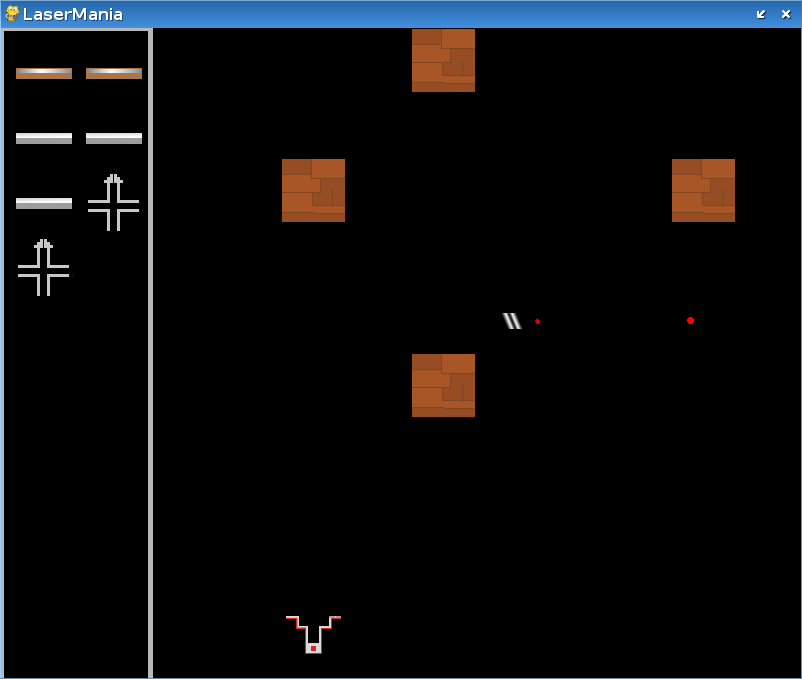
LaserMania development


Lasermania finally has something to see moving. Its this game where you have to arrange specific mirrors in proper places to guide a photon from emitter to reciever. Its written in pygame/python. In the screenshot you can see the photon(red dot) to the right. The emitter now fires a photon, drag and drop works(almost), only the mirror logic is left.